
5069-OB16: Wiring, Studio 5000 Configuration, and Output Control
1. Module Overview
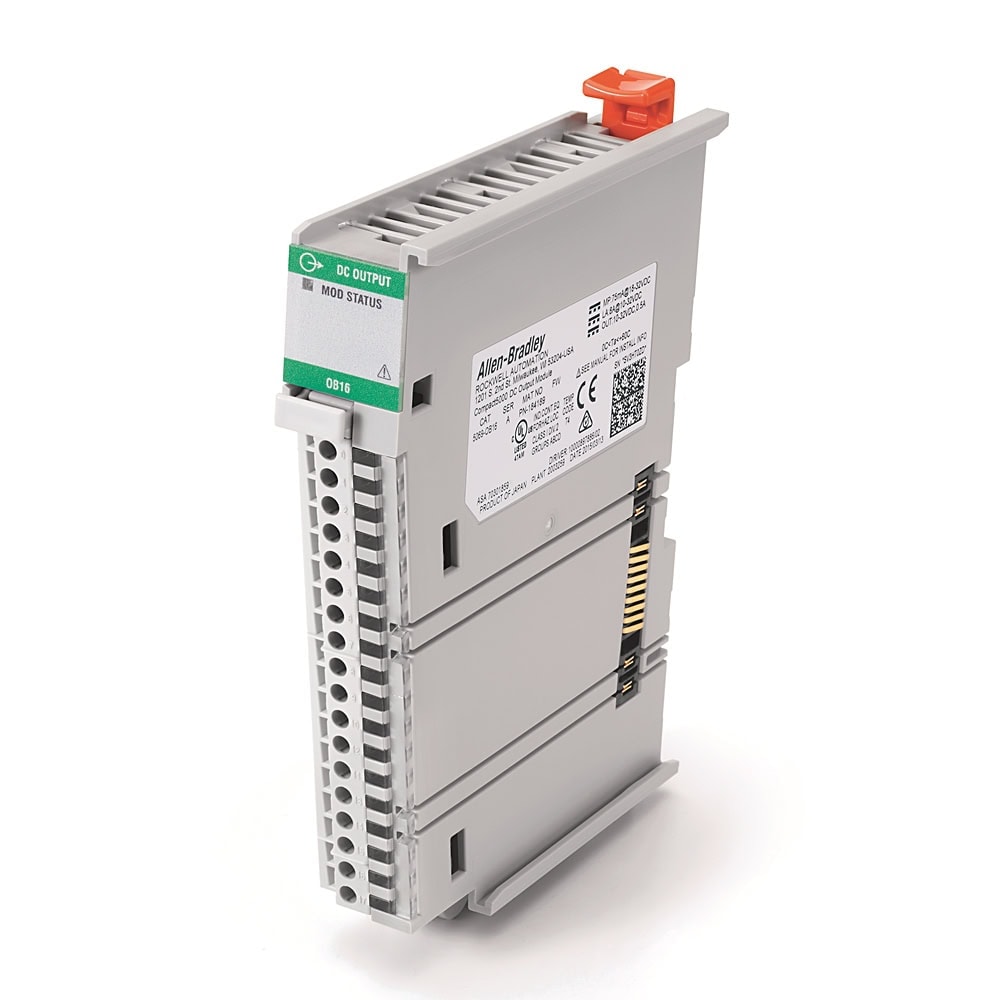
The 5069-OB16 is part of the Compact 5000 I/O platform. It plugs directly into the high-speed local I/O bus on the right side of a 5069-L3xx CompactLogix controller (or other 5069 I/O modules) and requires no separate backplane or rack assembly.
Catalog Number Breakdown
| Code | Meaning | Value |
|---|---|---|
| 5069 | Platform | Compact 5000 -- high-speed local I/O bus |
| O | I/O direction | Output module |
| B | Signal type | DC digital (Boolean) |
| 16 | Channel count | 16 output points |
Key Specifications
| Parameter | Value |
|---|---|
| Output type | Solid-state source (high-side switch) |
| Rated voltage | 24VDC (10 -- 32VDC operating range) |
| Max current per point | 0.5A continuous |
| Max current per module | 8A total (all 16 channels combined) |
| Output protection | Electronic short circuit / overcurrent per point |
| Output OFF leakage | <0.5 mA per point |
| Output delay time (backplane to screw, Off to On and On to Off) | ≤100 us (≤0.1 ms) @ 25 C / 0.5A |
| LA Power | 0.5A per channel, 8A per module @ 10 -- 32VDC |
| MOD Power | 75 mA @ 18 -- 32VDC |
| Power dissipation (max) | 3.25 W (16 channels @ 0.5A) |
| On-state voltage drop (max) | <0.2VDC |
| Off-state voltage (max) | 5VDC with 1 mA min load |
| Terminal block | Removable 18-position RTB (5069-RTB18-SPRING or 5069-RTB18-SCREW, ordered separately) |
| Operating temperature | 0 to 60 C |
2. Hardware Installation
The 5069-OB16 mounts on an EN50022 35 x 7.5 mm DIN rail as part of the Compact 5000 system assembly. Modules interlock side by side and pass MOD power, SA power, and backplane communication module to module -- there is no separate chassis.
System Assembly Order (Left to Right)
- CompactLogix 5380 controller (e.g. 5069-L306ER) -- leftmost; external 24VDC is wired to its MOD and SA power RTBs. There is no separate 5069 power supply module.
- Local I/O modules (5069-OB16 and others) -- to the right of the controller. Slot 1 is the first module right of the controller. Maximum local modules: 8 for the 5069-L306ER and 5069-L310ER, 16 for the 5069-L320ER, 31 for the 5069-L330ER and larger. A 5069-FPD field potential distributor starts a new SA power bus where one is needed (for example, to separate AC and DC SA modules).
- End cap -- ships with the controller/adapter; required on the last module.
Mounting the 5069-OB16
- Power off the system. Confirm that MOD power and all sources of SA and LA power are off.
- Mount the DIN rail. Secure the DIN rail to the mounting surface approximately every 200 mm, following Rockwell's Industrial Automation Wiring and Grounding Guidelines (publication 1770-4.1).
- Remove the end cap from the right-most module in the system, if one is installed. Keep it -- it goes back on the last module.
- Close the DIN rail latch. If the module's DIN rail latches are open, gently push the rear latch back until the front latch pops up and clicks.
- Align the interlocking pieces of the module with the device on its left (controller or previous I/O module). The top interlocking pieces engage first.
- Push the module toward the DIN rail until a click indicates that it is locked in place.
- Install the end cap on the last module: align it with the interlocking pieces and push it toward the DIN rail until it locks. Install it only after the last module is in place, and never from the backwards direction -- that can damage the MOD and SA power bus connectors.
Installing the RTB
- Hook the bottom of the RTB into the RTB tab on the module.
- Push the RTB against the module until it clicks into place.
- Push the RTB handle against the RTB until you hear a second click.
Wiring the RTB: strip 12 mm (0.47 in.) for the screw RTB and torque to 0.4 N•m (3.5 lb•in); strip 10 mm (0.39 in.) for the spring RTB and push the wire in (crimp a ferrule on wire that is too thin). One conductor per terminal.
3. Wiring
The 5069-OB16 uses an 18-position removable terminal block (5069-RTB18-SPRING or 5069-RTB18-SCREW, ordered separately). The 16 output channels occupy pins 0 through 15. The module receives field-side power via the Local Actuator (LA) terminals -- LA+ and LA- -- on pins 16 and 17. You must supply external 24VDC field power to the LA+ and LA- terminals. The module does not draw current from the SA power bus that is internal to the system.
Terminal Assignments
| Terminal | Label | Function | Notes |
|---|---|---|---|
| 0 | Out 0 | Output channel 0 | Sources +24VDC when ON |
| 1 | Out 1 | Output channel 1 | Sources +24VDC when ON |
| 2 | Out 2 | Output channel 2 | Sources +24VDC when ON |
| 3 | Out 3 | Output channel 3 | Sources +24VDC when ON |
| 4 | Out 4 | Output channel 4 | Sources +24VDC when ON |
| 5 | Out 5 | Output channel 5 | Sources +24VDC when ON |
| 6 | Out 6 | Output channel 6 | Sources +24VDC when ON |
| 7 | Out 7 | Output channel 7 | Sources +24VDC when ON |
| 8 | Out 8 | Output channel 8 | Sources +24VDC when ON |
| 9 | Out 9 | Output channel 9 | Sources +24VDC when ON |
| 10 | Out 10 | Output channel 10 | Sources +24VDC when ON |
| 11 | Out 11 | Output channel 11 | Sources +24VDC when ON |
| 12 | Out 12 | Output channel 12 | Sources +24VDC when ON |
| 13 | Out 13 | Output channel 13 | Sources +24VDC when ON |
| 14 | Out 14 | Output channel 14 | Sources +24VDC when ON |
| 15 | Out 15 | Output channel 15 | Sources +24VDC when ON |
| 16 | LA+ | Local Actuator power +24VDC | Connect to +24VDC from external field power supply |
| 17 | LA- | Local Actuator power return (0VDC) | Connect to 0VDC of external field power supply |
How Source Outputs Work
When the PLC program energizes an output (e.g. channel 0), the module internally connects the LA+ supply rail to the Out 0 terminal through a solid-state switch. Current flows from the output terminal, through the field device, and returns to the LA- (0VDC) rail via the device's ground/common connection. The load connects between the output point and the LA- (return) side of the power supply.
Connecting Common Field Devices
| Field Device | Wiring | Notes |
|---|---|---|
| 24VDC indicator light | Output terminal to LED (+), LED (-) to LA- | Verify LED rated current is under 0.5A. Most panel LEDs draw 10-30mA -- well within limits. |
| 24VDC relay coil | Output terminal to coil (+), coil (-) to LA- | Install a suppression device across the coil. See inductive load protection below. |
| 24VDC solenoid valve | Output terminal to solenoid (+), solenoid (-) to LA- | Steady current must be 0.5A or less. Inrush up to 1A for 10 ms (repeatable every 2 s) is within rating; above that, use an interposing relay. |
| Motor starter contactor (24VDC coil) | Output terminal to coil A1, coil A2 to LA- | Check the contactor's coil current against the 0.5A rating (0.5A pilot duty per channel). Add a suppression device. |
| 120/240VAC loads | Not directly supported | Use a 24VDC interposing relay or the 5069-OW16 relay output module instead. |
Inductive Load Protection
When driving inductive loads (relay coils, solenoid valves, contactors), the collapsing magnetic field generates a voltage spike when the output turns OFF. While the 5069-OB16 includes internal clamp circuitry, it is best practice to install external suppression at the load to extend output life and reduce electrical noise:
- Suppression device at the load -- Install a suppression device rated for the coil (diode or RC network) per Rockwell's Industrial Automation Wiring and Grounding Guidelines, publication 1770-4.1.
I.Ptxx.ShortCircuit. The module total is 8A. Use an interposing relay for high-current loads, or upgrade to a higher-capacity output module.
Common / Return Wiring Best Practice
4. Studio 5000 Configuration
Adding the Module to the I/O Tree
- In the Controller Organizer, expand I/O Configuration and right-click your controller node
- Select New Module and search for
5069-OB16 - Select the module from the catalog and click Create
- Set the Slot number to match the physical position. Slot 1 = first module right of the controller, Slot 2 = second module, etc.
- Set the module Name (e.g.
DO_Slot3) -- this becomes the prefix for all output tags - Click OK -- the module appears in the I/O tree and output tags are created automatically
Output Data Tags
Once the 5069-OB16 is added to the I/O tree, Studio 5000 creates the following tag structure (assuming slot 3 and module name DO_Slot3):
| Tag | Type | Description |
|---|---|---|
Local:3:O.Pt00.Data | BOOL | Output channel 0 (1 = ON, 0 = OFF) |
Local:3:O.Pt01.Data | BOOL | Output channel 1 |
Local:3:O.Pt02.Data through .15 | BOOL | Output channels 2 through 15 |
Local:3:I.ConnectionFaulted | BOOL | Controller lost connection to the module — affects all channels |
Local:3:I.Ptxx.Fault | BOOL | Per-point fault — point data quality is bad (xx = 00–15) |
Local:3:I.Ptxx.NoLoad | BOOL | No load detected on the point (disabled by default; enable per point on the Points page) |
Local:3:I.Ptxx.ShortCircuit | BOOL | Short circuit detected on the point |
Local:3:I.Ptxx.Data | BOOL | Data echo — reflects the commanded output state (xx = 00–15) |
Local:3:I.Ptxx.Uncertain | BOOL | Point data can be imperfect |
Local:3:I.DiagnosticActive | BOOL | TRUE if any diagnostics are active or prognostic threshold reached |
Local:3:I.DiagnosticSequenceCount | SINT | Increments each time a diagnostic condition is detected or removed |
Local:3:I.RunMode | BOOL | TRUE when module is in Run Mode |
SOL_Valve_1, Motor_1_Run, Pilot_Green. This makes the ladder logic self-documenting and significantly easier to troubleshoot on-site.
Configuring Fault and Program Mode Output States
- In the I/O tree, right-click the 5069-OB16 module and select Properties
- Go to the Points page
- Under Output States in Fault Mode, choose per point:
- Off (default) -- the output turns OFF if a fault condition occurs. This is the safest option for most applications.
- Hold Last State -- the output remains in its current state during a fault.
- On -- the output is forced ON during a fault.
- Under Duration of Fault Mode, choose per point:
- Forever (default) -- the output remains in the fault state until the fault is cleared.
- 1, 2, 5, or 10 seconds -- the output holds the fault state for the specified duration, then goes to the configured final state (Off or On).
- Under Output States in Program Mode, choose per point:
- Off (default) -- outputs turn OFF when the controller is in Program mode.
- Hold Last State -- outputs remain in their last commanded state.
- On -- outputs are forced ON.
- Click OK to save
Inhibiting Outputs
During commissioning, you can inhibit the entire module to prevent any outputs from energizing while you test other parts of the system:
- Right-click the 5069-OB16 in the I/O tree
- Select Properties and check Inhibit Module
- With the module inhibited, the outputs go to the state configured for Program mode (Off by default, but Hold Last State or On if you configured that) regardless of the program logic. The module status shows a yellow triangle in the I/O tree.
- When ready to go live, uncheck Inhibit Module and apply
5. Controlling Outputs in Ladder Logic
Core Output Instructions
| Instruction | Mnemonic | Behavior | Use Case |
|---|---|---|---|
| Output Energize | OTE | ON when rung is true, OFF when rung is false. Evaluated every scan. | Standard output control -- indicator lights, solenoids, motor run outputs |
| Output Latch | OTL | Sets the output ON when rung goes true. Remains ON even when rung goes false. | Latching a fault indicator that must be explicitly reset |
| Output Unlatch | OTU | Resets a latched output OFF when rung is true. | Clearing a latched fault or alarm |
Accessing Output Tags
In ladder logic, reference the output data tags using the standard Compact 5000 addressing format:
Practical Example: Motor Contactor Control with Interlock Logic
The following ladder logic controls a motor contactor and indicator lights using the 5069-OB16 (Slot 3). Inputs are on a 5069-IB16 (Slot 2). This implements a standard start/stop seal-in circuit with an overload interlock and a gate-position permissive. Motor_1_Fault is a controller-scoped BOOL.
6. Diagnostics & Troubleshooting
LED Indicators
| LED | State | Meaning |
|---|---|---|
| MOD (Module Status) | Solid green | Module operating normally, connected to controller |
| MOD | Flashing green | No connection to the controller -- missing, incomplete, or incorrect module configuration |
| MOD | Solid red | Nonrecoverable fault -- cycle power; if it stays steady red, replace the module |
| MOD | Flashing red | Firmware update in progress or failed, a recoverable fault, or a connection timeout -- check the Connection and Module Info pages; cycle power or click Reset Module |
| I/O 0-15 | Steady yellow | Output point is ON |
| I/O 0-15 | Off | Output point is OFF, or no module power is applied |
| I/O 0-15 | Flashing red | No Load (output off), short circuit/overload, or field power loss (Series B) |
Detectable Fault Conditions
The 5069-OB16 provides three categories of diagnostics, reported through per-point input tags:
| Fault Type | Description | Module Behavior |
|---|---|---|
| Short Circuit Protection | Output current exceeds the module's rated capacity on a channel | The point turns off and I.Ptxx.ShortCircuit is set; I/O indicator flashes red. When the short is removed, the point restarts in its commanded state. |
| No Load Detection | Detected only while the output is OFF (for at least 250 ms) when the load draws less than 0.5 mA -- a broken wire or missing load. Disabled by default; enable it per point on the Points page. | Sets I.Ptxx.NoLoad; I/O indicator flashes red |
| Field Power Loss | The external 24VDC field power supply connected to LA+/LA- is missing or below threshold | All points fault (I.Ptxx.Fault = 1) and turn off; I/O indicators flash red. 5069-OB16 Series B hardware only. |
Per-point short-circuit/overload protection is electronic; overvoltage protection (36V max) is fuse protected, and the module has reverse voltage protection.
Monitoring Point Faults in the PLC Program
Use the per-point fault tags to detect and alarm on channel-level issues:
Once the condition is removed (short repaired, load reconnected, field power restored), the point restarts in its commanded state automatically; no toggle or reset is required. After field power returns, an output commanded ON turns on 100 ms after the condition is resolved, and the module can need up to 1 s more to complete recovery.
Checking Module Status in the Program
For runtime diagnostics, check the module status tags programmatically:
| Tag | Check | Action |
|---|---|---|
Local:3:I.Ptxx.Fault | True = fault on that output point | Check the specific diagnostic tags below |
Local:3:I.Ptxx.ShortCircuit | True = overcurrent/short on that channel | Disconnect load, check wiring, measure current |
Local:3:I.Ptxx.NoLoad | True = no load detected while the output is OFF | Check field wiring, verify load is connected |
Local:3:I.ConnectionFaulted | True = controller connection lost | Check that the module is fully latched and interlocked and that the end cap is installed on the last module; power cycle |
Local:3:I.DiagnosticActive | True = at least one diagnostic active | Review Ptxx tags to identify specific fault |
Common Troubleshooting Scenarios
| Symptom | Likely Cause | Resolution |
|---|---|---|
| Output ON in program but field device does not energize | No field power supply connected to LA+/LA- terminals, external PSU failure, broken wire | Verify 24VDC present at LA+/LA- terminals with multimeter; check wiring continuity |
| Output point LED flashing red | Short circuit/overload, No Load (if enabled), or field power loss | Check the Ptxx.ShortCircuit and Ptxx.NoLoad tags and the LA supply. Measure load current with a clamp meter before reconnecting a load that tripped. |
| All outputs dead, MOD LED flashing green | Module not configured in Studio 5000 or module inhibited | Verify module is in the I/O tree at the correct slot number; check Inhibit Module is unchecked |
| Outputs drop out intermittently | Loose terminal connection, marginal field power supply voltage | Re-torque terminal connections; verify 24VDC field supply stays within 10 -- 32VDC under load |
| MOD LED solid red | Unrecoverable hardware fault | Cycle power. If the red LED persists, the module has failed and must be replaced. |
| Module shows yellow triangle in I/O tree | Module inhibited, slot number mismatch, or module not physically present | Right-click the module in the I/O tree, check properties, verify physical slot matches configuration |
7. Related 5069 Digital Output Modules
Rockwell offers several digital output modules in the Compact 5000 platform. Selecting the right module depends on channel count, load type, safety requirements, and environmental conditions.
| Catalog Number | Channels | Output Type | Max Current/Point | Key Feature |
|---|---|---|---|---|
| 5069-OB16 | 16 | 24VDC source (solid-state) | 0.5A | Standard digital output -- this guide |
| 5069-OBV8S | 8 | 24VDC source / bipolar (safety) | 1A (horizontal mounting; 0.7A other orientations) | Safety outputs up to SIL 3, PLe, Cat. 4 -- requires Compact GuardLogix |
| 5069-OB16K | 16 | 24VDC source (solid-state) | 0.5A | Conformal coated for harsh environments (humidity, dust, chemical exposure) |
| 5069-OB32 | 32 | 24VDC source (solid-state) | 0.5A | High-density 32-point module in a 1.5-slot-wide form factor |
| 5069-OB16F | 16 | 24VDC source (solid-state) | 0.5A | Fast output: sub-millisecond response for high-speed sorting, filling, or marking |
| 5069-OW16 | 16 | Relay (Form A, two groups of 8) | 2A | Relay outputs for 5-264V AC or 5-125V DC loads; no channel-to-channel isolation (use 5069-OW4I for isolated relays) |
8. Related Guides
Continue building your Compact 5000 system with these guides:
5069 Digital Input Guide
Wiring pushbuttons, proximity sensors, and limit switches to the 5069-IB16 digital input module.
5069 Analog Output Guide
Configuring the 5069-OF8 for 4-20mA and 0-10V control signals to drives, valves, and transducers.
CompactLogix 5069-L306ER Setup
First-time controller setup, power wiring, Studio 5000 project creation, and EtherNet/IP network configuration.
Reference Documentation
The following Rockwell Automation publications were used as references for this guide. These are the official manufacturer documents for the hardware covered in this article.
| Publication | Description | Download |
|---|---|---|
| 5069-UM004 | Compact 5000 Digital I/O Modules User Manual | |
| 5069-IN007 | 5069-OB16 Installation Instructions | |
| 5069-TD001 | Compact 5000 I/O Technical Data |
Shop the Compact 5000 I/O Range
Digital output modules and the full Compact 5000 I/O catalog.
Need a 5069-OB16 or Other Compact 5000 I/O?
PLC Exchange stocks 5069-series digital output modules with a 2.5-year warranty and same-day shipping. Get pricing in a few hours.