
5069-IB16: Installation, Wiring, Configuration, and Programming Guide
1. Module Overview
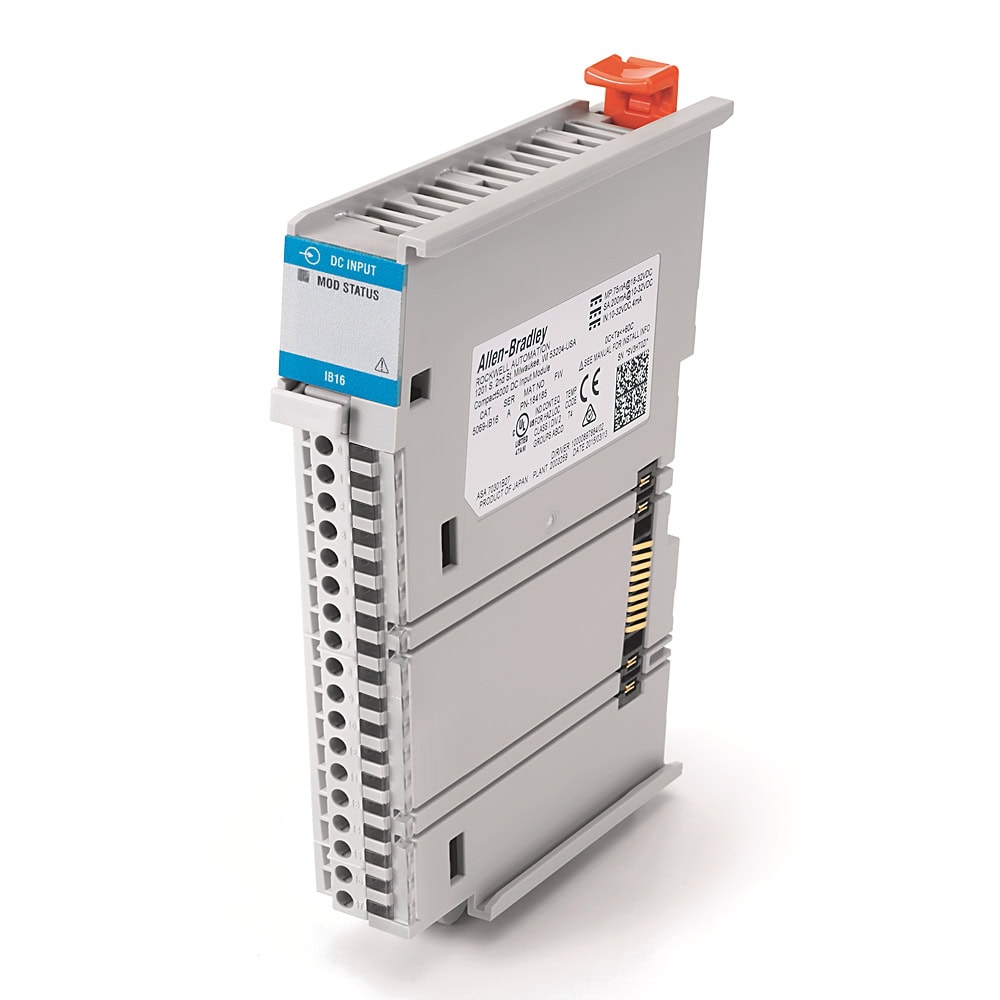
The 5069-IB16 is a fixed 16-point sink-type digital input module designed for the Compact 5000 I/O platform. It reads 24VDC discrete signals from field devices and presents them to the controller as individual per-point tags (Ptxx.Data). Each channel has an individual status indicator and configurable input filter times for noise rejection.
Catalog Number Breakdown
| Code | Meaning | Value |
|---|---|---|
| 5069 | Platform | Compact 5000 -- high-speed local I/O bus |
| I | Module type | Input |
| B | Signal type | DC (B = DC digital; A = AC digital, as in the 5069-IA16) |
| 16 | Channel count | 16 discrete input points |
Key Specifications
| Parameter | Value |
|---|---|
| Number of Inputs | 16 |
| Rated Voltage | 24VDC (range: 10 -- 32VDC) |
| Input Type | Sinking, 1 group of 16 (current flows into each input terminal and returns through the module to SA(-)) |
| ON-State Voltage | 10VDC minimum (guaranteed ON above 10V) |
| OFF-State Voltage | 5VDC maximum (guaranteed OFF below 5V) |
| Input Current (ON) | Approximately 6 mA per channel at 24VDC (range: 4 -- 7.4 mA at 10 -- 32VDC) |
| Input Filter Time | User-selectable: 0 -- 50 ms, default 1 ms (hardware delay: 50 µs + filter time) |
| Isolation | Channels share a common reference (non-isolated) |
| Terminal Block Type | Removable 18-position RTB (5069-RTB18-SPRING or 5069-RTB18-SCREW, ordered separately) |
| Wire Gauge | 22 -- 16 AWG (0.34 -- 1.5 mm²) solid or stranded shielded copper wire |
| Power Dissipation (max) | 3.9 W |
| MOD Power | 75 mA @ 18 -- 32VDC |
| SA Power | 200 mA @ 10 -- 32VDC |
| Operating Temperature | 0 to 60 C (32 to 140 F) |
2. Hardware Installation
The 5069-IB16 mounts on an EN50022 35 x 7.5 mm DIN rail (zinc-plated, chromate-passivated steel) as part of the Compact 5000 system assembly. Modules interlock side by side and pass MOD power, SA power, and backplane communication module to module -- there is no separate chassis. A CompactLogix 5380 controller (or a 5069-AENTR / 5069-AEN2TR adapter for remote I/O) supplies MOD and SA power to the modules; each is fed from external 24VDC power wired to the controller's MOD and SA power terminal blocks. There is no separate 5069 power supply module.
System Assembly Order
Left to right, the assembly order is:
| Position | Module | Example |
|---|---|---|
| Slot 0 (leftmost) | Controller | 5069-L306ER, 5069-L310ER, 5069-L320ER, etc. |
| Slot 1 onward | I/O Modules | 5069-IB16 in any available slot. Maximum local modules depends on the controller: 8 for the 5069-L306ER and 5069-L310ER, 16 for the 5069-L320ER, 31 for the 5069-L330ER and larger. |
| Rightmost | End Cap | Required on the last module in the system |
Installation Steps
- Power off the system. Confirm that MOD power and all sources of SA power are off.
- Mount the DIN rail. Secure the DIN rail to the mounting surface approximately every 200 mm, following Rockwell's Industrial Automation Wiring and Grounding Guidelines (publication 1770-4.1).
- Remove the end cap from the right-most module in the system, if one is installed. Keep it -- it goes back on the last module.
- Close the DIN rail latch. If the module's DIN rail latches are open, gently push the rear latch back until the front latch pops up and clicks.
- Align the interlocking pieces of the module with the device on its left (controller or previous I/O module). The top interlocking pieces engage first.
- Push the module toward the DIN rail until a click indicates that it is locked in place.
- Install the end cap on the last module: align it with the interlocking pieces and push it toward the DIN rail until it locks. Install it only after the last module is in place, and never from the backwards direction -- that can damage the MOD and SA power bus connectors.
- Note the slot number. Count from left to right starting at the first I/O module position after the controller. The first module is Slot 1, the second is Slot 2, and so on. Record the slot number for Studio 5000 configuration.
Terminal Block Removal
The 5069-IB16 uses a removable 18-position terminal block (RTB), either the 5069-RTB18-SPRING (spring-clamp) or 5069-RTB18-SCREW (screw-type). RTBs must be ordered separately -- they do not ship with the module. This allows you to pre-wire the terminal block at a bench before installing it on the module, or to swap a module without rewiring. The RTB does not support removal and insertion under power -- remove power first.
- Hook the bottom of the RTB into the RTB tab on the module.
- Push the RTB against the module until it clicks into place.
- Push the RTB handle against the RTB until you hear a second click.
Wiring the RTB: strip 12 mm (0.47 in.) for the screw RTB and torque to 0.4 N•m (3.5 lb•in); strip 10 mm (0.39 in.) for the spring RTB and push the wire in (crimp a ferrule on wire that is too thin). One conductor per terminal.
3. Wiring
Terminal Assignments
The 5069-IB16 uses an 18-position removable terminal block (5069-RTB18-SPRING or 5069-RTB18-SCREW, ordered separately). The 16 input channels occupy pins 0 through 15. Pins 16 and 17 are not connected. The common return path is through the internal module circuitry to the SA(-) terminal on the SA power bus RTB -- there are no dedicated COM pins on the field wiring RTB.
| Pin | Function | Tag Address (Slot 1) |
|---|---|---|
| 0 | Input 0 | Local:1:I.Pt00.Data |
| 1 | Input 1 | Local:1:I.Pt01.Data |
| 2 | Input 2 | Local:1:I.Pt02.Data |
| 3 | Input 3 | Local:1:I.Pt03.Data |
| 4 | Input 4 | Local:1:I.Pt04.Data |
| 5 | Input 5 | Local:1:I.Pt05.Data |
| 6 | Input 6 | Local:1:I.Pt06.Data |
| 7 | Input 7 | Local:1:I.Pt07.Data |
| 8 | Input 8 | Local:1:I.Pt08.Data |
| 9 | Input 9 | Local:1:I.Pt09.Data |
| 10 | Input 10 | Local:1:I.Pt10.Data |
| 11 | Input 11 | Local:1:I.Pt11.Data |
| 12 | Input 12 | Local:1:I.Pt12.Data |
| 13 | Input 13 | Local:1:I.Pt13.Data |
| 14 | Input 14 | Local:1:I.Pt14.Data |
| 15 | Input 15 | Local:1:I.Pt15.Data |
| 16 | No Connect | -- |
| 17 | No Connect | -- |
Sink Wiring Configuration
For sink wiring (the standard configuration for the 5069-IB16), connect field devices as follows:
| From | To | Description |
|---|---|---|
| +24VDC supply | Field device (one side) | Positive leg of field power supply |
| Field device (other side) | Input terminal (pin 0 -- 15) | Signal wire to the module input channel |
| SA power DC(-) | 0VDC supply | Return path through internal module circuitry to SA(-) on the SA power bus |
When the field device closes (pushbutton pressed, sensor triggered, relay contact closed), 24VDC is applied to the input terminal, current flows through the module's internal sensing circuit, and returns via the SA(-) terminal to 0VDC. The module registers the input as ON.
Typical Field Device Wiring Examples
| Field Device | Contact Type | Wiring | Notes |
|---|---|---|---|
| Pushbutton (Start) | Normally Open (NO) | +24V → PB terminal → Input pin | Input ON when button is pressed |
| Pushbutton (Stop / E-Stop) | Normally Closed (NC) | +24V → PB terminal → Input pin | Input ON normally; drops OFF when pressed or wire broken (fail-safe) |
| Inductive Proximity Sensor (3-wire NPN) | NPN sinking output | Not supported | Not compatible. An NPN output also sinks to 0V, so no current flows into the input. Use a PNP sensor, or a sourcing input module. |
| Inductive Proximity Sensor (3-wire PNP) | PNP sourcing output | +24V → sensor BN (brown); sensor BK (black) → Input pin; sensor BU (blue) → 0VDC | PNP sensors source +24V into the input when active -- the correct sensor type for a sinking input |
| Limit Switch | NO or NC mechanical | +24V → switch terminal → Input pin | Same as pushbutton wiring; use NC for travel-limit safety applications |
| Overload Relay (aux contact 95-96) | NC | +24V → terminal 95 → terminal 96 → Input pin | Input ON = OL normal; OFF = OL tripped (fail-safe) |
| Contactor Auxiliary (13-14) | NO | +24V → terminal 13 → terminal 14 → Input pin | Feedback contact confirms contactor has physically pulled in |
4. Studio 5000 Configuration
After physically installing the module, you need to add it to the Studio 5000 project I/O tree so the controller knows it exists and can communicate with it.
Adding the Module to the I/O Tree
- In Studio 5000 Logix Designer, expand the Controller Organizer (left panel) → I/O Configuration → expand your controller node.
- Right-click the controller node → New Module.
- In the module search dialog, type
5069-IB16and select it from the results. Click Create. - Set the Name -- use a descriptive name such as
DI_Panel1orDI_Slot1. - Set the Slot number to match the physical position. Slot 1 = first I/O module to the right of the controller, Slot 2 = second module, and so on.
- Click OK. The module appears in the I/O tree with its input tags auto-generated.
Module Properties -- Connection Tab
Right-click the 5069-IB16 in the I/O tree and select Properties. The key settings on the Connection tab:
| Setting | Options | Recommendation |
|---|---|---|
| RPI (Requested Packet Interval) | 0.2 -- 750 ms | Set to the rate your logic needs; use a faster RPI for fast-responding applications. Changing the RPI online closes and reopens the connection to the module. |
| Connection Type | Unicast or Multicast | Unicast (default). Use Multicast only if multiple controllers need to consume the same input data. |
Configuring Input Filter Times
Input filters reject electrical noise and contact bounce. Each of the 16 channels can be configured individually. In the module properties, go to the Input Configuration tab:
| Filter Time | Use Case |
|---|---|
| 0 ms (Off) | High-speed pulse counting, encoder signals, or signals already debounced externally |
| 1 -- 5 ms | Clean electronic signals (proximity sensors, photoelectric sensors) |
| 5 -- 10 ms | General purpose -- good balance of response time and noise rejection |
| 10 -- 20 ms | Mechanical contacts with moderate bounce (limit switches) |
| 20 -- 50 ms | Pushbuttons, toggle switches, relay contacts with significant bounce, or very noisy environments |
The filter time is user-selectable from 0 to 50 ms in the module properties; the default is 1 ms. The total input delay is the hardware delay (50 µs) plus the configured filter time.
Data Transfer: RPI and Change of State
Compact 5000 I/O modules use the Producer/Consumer model: the module produces its data without being polled. Input data is sent to the controller at the RPI, the rate you set on the Connection tab. See 5069-UM004, "Data Transfer at RPI or Change of State", for the COS options on Compact 5000 input modules.
Input Data Tags
Once the module is added, Studio 5000 automatically creates the following controller-scoped tags for a module in Slot 1 (the Local:1 prefix comes from the slot, not the module name):
| Tag | Data Type | Description |
|---|---|---|
Local:1:I.ConnectionFaulted | BOOL | TRUE if the module has lost communication with the controller |
Local:1:I.Ptxx.Fault | BOOL | Per-point fault — point data quality is bad (xx = 00–15) |
Local:1:I.Ptxx.Data | BOOL | Per-point input status — 0 or 1 (xx = 00–15) |
Local:1:I.Ptxx.Uncertain | BOOL | Per-point data uncertainty flag (xx = 00–15) |
Local:1:I.DiagnosticActive | BOOL | TRUE if any diagnostics are active or the prognostic threshold is reached |
Local:1:I.DiagnosticSequenceCount | SINT | Increments each time a diagnostic condition is detected or removed (0 -- 255, wraps skipping zero) |
Local:1:I.RunMode | BOOL | TRUE when the module is in Run Mode |
PB_Start to Local:1:I.Pt00.Data. This makes your ladder logic self-documenting and simplifies maintenance when I/O assignments change -- you update the alias, not every rung.
5. Reading Inputs in Ladder Logic
Digital inputs from the 5069-IB16 are read using standard ladder logic instructions. The two most common instructions for discrete inputs:
| Instruction | Name | Function |
|---|---|---|
| XIC | Examine If Closed | TRUE when the bit is 1 (input is ON). Equivalent to a normally open contact in relay logic. |
| XIO | Examine If Open | TRUE when the bit is 0 (input is OFF). Equivalent to a normally closed contact in relay logic. |
Tag Addressing
For a 5069-IB16 in Slot 1, individual input bits are addressed as:
Practical Example: Motor Start/Stop with E-Stop and Limit Switches
This example demonstrates a complete motor control circuit using the 5069-IB16 for inputs and a 5069-OB16 (digital output module in Slot 2) for outputs. The circuit includes a start pushbutton, stop pushbutton, emergency stop status, overload relay feedback, contactor feedback, and high/low limit switches.
I/O Assignment Table
| Tag Alias | I/O Address | Module | Field Device | Contact Type |
|---|---|---|---|---|
| PB_Start | Local:1:I.Pt00.Data | 5069-IB16 Slot 1 | Green pushbutton | NO momentary |
| PB_Stop | Local:1:I.Pt01.Data | 5069-IB16 Slot 1 | Red pushbutton | NC momentary (wired NC) |
| EStop_OK | Local:1:I.Pt02.Data | 5069-IB16 Slot 1 | E-Stop mushroom head | NC (wired NC -- fail-safe) |
| OL_OK | Local:1:I.Pt03.Data | 5069-IB16 Slot 1 | Overload relay (95-96) | NC (opens on OL trip) |
| LS_High | Local:1:I.Pt04.Data | 5069-IB16 Slot 1 | High-level limit switch | NO (closes at high level) |
| LS_Low | Local:1:I.Pt05.Data | 5069-IB16 Slot 1 | Low-level limit switch | NO (closes at low level) |
| Motor_Run_FB | Local:1:I.Pt06.Data | 5069-IB16 Slot 1 | Contactor aux (13-14) | NO (confirms contactor pulled in) |
| PB_FaultReset | Local:1:I.Pt07.Data | 5069-IB16 Slot 1 | Fault reset pushbutton | NO momentary |
| Motor_Run | Local:2:O.Pt00.Data | 5069-OB16 Slot 2 | Motor contactor coil | 24VDC coil |
| Pilot_Run | Local:2:O.Pt01.Data | 5069-OB16 Slot 2 | Green pilot light | 24VDC LED |
| Pilot_Fault | Local:2:O.Pt02.Data | 5069-OB16 Slot 2 | Red pilot light | 24VDC LED |
| Fill_Pump_Run | Local:2:O.Pt03.Data | 5069-OB16 Slot 2 | Fill pump contactor coil | 24VDC coil |
Example Logic (Structured Text)
The routine is shown in Structured Text; each block maps to one ladder rung, described in the comment above it. FB_Timer is an FBD_TIMER (used by the ST TONR instruction) and Motor_Fault is a BOOL, both controller-scoped.
6. Diagnostics & Troubleshooting
LED Indicators
The 5069-IB16 has the following LED indicators on the module face:
| LED | Color | State | Meaning |
|---|---|---|---|
| MOD (Module Status) | Steady green | Normal | The module has a connection to the controller and is operating normally |
| MOD | Flashing green | No connection | No connection to the controller -- missing, incomplete, or incorrect module configuration |
| MOD | Steady red | Nonrecoverable fault | Cycle power to the module; if it stays steady red, replace the module |
| MOD | Flashing red | Recoverable fault | Firmware update in progress or failed, a recoverable fault, or a connection timeout -- check the Connection and Module Info pages; cycle power or click Reset Module |
| MOD | Off | No power | Power is not applied -- confirm the system is powered and the module is installed properly |
| I/O 0 -- 15 | Steady yellow | ON | The corresponding input is ON |
| I/O 0 -- 15 | Off | OFF | The input is OFF, or no module power is applied |
Common Faults and Resolutions
| Symptom | Likely Cause | Resolution |
|---|---|---|
| Module shows yellow triangle in I/O tree | Slot number mismatch between project and physical position | Verify the slot number in module properties matches the physical position. Recount slots from the controller. |
| MOD LED flashing red | Connection timeout or configuration mismatch | Go online in Studio 5000. Right-click the module → Properties → check for error messages on the Connection tab. Re-download the project if configuration was changed. |
| Input channel LED is ON but tag reads 0 in Studio 5000 | Module is inhibited or connection is faulted | Check if the module is inhibited: right-click in I/O tree → Properties → Connection tab → uncheck "Inhibit Module." Also verify the project has been downloaded after adding the module. |
| Input channel LED is OFF but field device is activated | Wiring fault -- no voltage reaching the input terminal | Check field wiring: verify 24VDC is present at the field device output, check for broken wires, and confirm SA power DC(-) is connected to 0VDC. Measure voltage at the input terminal with a multimeter (should be >10VDC when ON). |
| Input chatters (rapidly toggles ON/OFF) | Electrical noise or contact bounce exceeding filter time | Increase the input filter time for that channel in module properties. If using mechanical contacts, try 10 -- 20 ms. For electronic sensors in noisy environments, check shielding and cable routing. |
| All 16 inputs read 0 | No field power supply, or SA power not connected | Verify the external 24VDC power supply is energized and SA power is present. Check that the SA power bus is properly established by the controller, adapter, or field potential distributor. |
| ConnectionFaulted tag is TRUE | Module has lost communication with the controller | Check that the module is fully latched and interlocked with the adjacent module and that the end cap is installed on the last module. Inspect the interlocking connectors for damage. Power-cycle the system. If persistent, the module or bus connector may be damaged. |
Checking Module Status in Studio 5000
- Go online with the controller (Controller → Go Online or Ctrl+W → Go Online).
- In the I/O tree, the module icon indicates status: green circle = OK, yellow triangle = warning, red X = faulted.
- Right-click the 5069-IB16 → Properties → Connection tab to view detailed status and any fault codes.
- To monitor all input states in real time, expand the module in the Controller Tags window and watch the
Local:X:I.Ptxx.Databits toggle as field devices are activated. - Use the Module Info tab to view firmware revision, serial number, and electronic keying status.
7. Related 5069 Digital Input Modules
The 5069 platform includes several digital input module variants for different application requirements:
| Catalog Number | Channels | Type | Key Difference | Typical Application |
|---|---|---|---|---|
| 5069-IB16 | 16 | 24VDC Sink | Standard -- this guide | General purpose discrete inputs |
| 5069-IB8S | 8 | 24VDC Safety | Safety input module (see 5069-UM003 for ratings) | E-Stop and safety gate circuits. Requires a Compact GuardLogix 5380 controller. |
| 5069-IB16K | 16 | 24VDC Sink (Conformal Coated) | Identical to IB16 but with conformal coating on PCB for harsh environments | High humidity, condensation, corrosive atmospheres (food/bev wash-down, coastal, chemical plants) |
| 5069-IB32 | 32 | 24VDC Sink | Double the density -- 32 inputs in a 1.5-slot-wide module | High-density applications where panel space is limited and I/O count is high |
| 5069-IB16F | 16 | 24VDC Sink (Fast) | Fast input with sub-millisecond response; supports field power loss detection | High-speed counting, pulse measurement, and applications requiring fast input response |
8. Related Guides
| Guide | Description |
|---|---|
| 5069-OB16 Digital Output Module Guide | Installation, wiring, and programming for the 16-channel 24VDC sourcing digital output module -- the output companion to the IB16. |
| 5069-IF8 Analog Input Module Guide | Configuration and scaling for the 8-channel analog input module -- 4-20mA and 0-10V signal wiring, channel configuration, and engineering unit scaling. |
| CompactLogix 5069-L306ER Setup Guide | First-time setup for the CompactLogix 5380 controller -- power wiring, Studio 5000 project creation, network setup, and downloading your first program. |
Reference Documentation
The following Rockwell Automation publications were used as references for this guide. These are the official manufacturer documents for the hardware covered in this article.
| Publication | Description | Download |
|---|---|---|
| 5069-UM004 | Compact 5000 Digital I/O Modules User Manual | |
| 5069-IN004 | 5069-IB16 Installation Instructions | |
| 5069-TD001 | Compact 5000 I/O Technical Data |
Shop the Compact 5000 I/O Range
Every Compact 5000 I/O module — digital, analog, specialty — from stock.